
Hi,
Actually my doubt is whether jitsi will support to make a call over the internet?
I like to explain what i have done and what i need help from you .

Steps to make jitsi client to work with kamailio.
1. I have installed kamailio server in my linux box, created
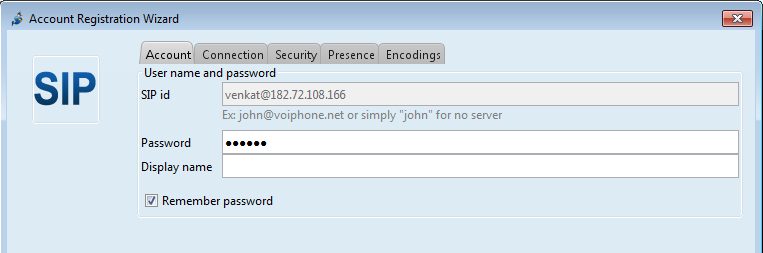
global ip to my local ip and i have installed jitsi client in my machine and my friend machine. 2. Then i registered my SIP accounts with the local ip address like below
3. Then i added contacts of my friends. All my friends are in online. I could make audio call and speak with each other with local network. In this case no problem.
4. But the problem is when i use public ip instead of local ip in account registration wizard, it is showing all my friends are in offline eventhough they are in online.
Actually my requirements is , I want to make audio call over internet(i.e from other domain). I really stuck in this case.
Please help me how to achieve this?
Advance Thanks, Balakrishnan.N
Hi,
Actually my doubt is whether jitsi will support to make a call over the internet?
I like to explain what i have done and what i need help from you .
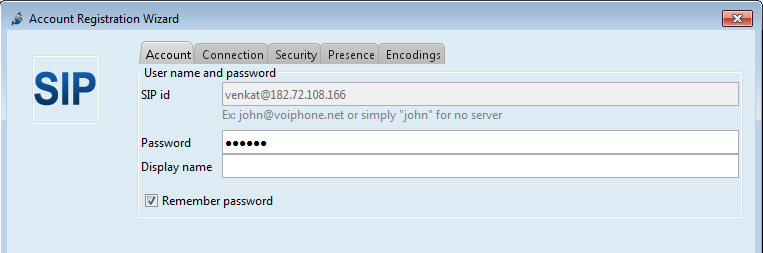
Steps to make jitsi client to work with kamailio. 1. I have installed kamailio server in my linux box, created global ip to my local ip and i have installed jitsi client in my machine and my friend machine. 2. Then i registered my SIP accounts with the local ip address like below
3. Then i added contacts of my friends. All my friends are in online. I could make audio call and speak with each other with local network. In this case no problem.
4. But the problem is when i use public ip instead of local ip in account registration wizard, it is showing all my friends are in offline eventhough they are in online.
Actually my requirements is , I want to make audio call over internet(i.e from other domain). I really stuck in this case.
Please help me how to achieve this?
Advance Thanks, Balakrishnan.N

Hello,
the question is probably more suitable for sr-users@lists.sip-router.org mailing list, here the discussions should be about exiting documentation or building new documentations.
sr-users is about how to use kamailio and has way larger number of participants.
Cheers, Daniel
On 12/6/13 7:21 AM, Balakrishnan Nainar wrote:
Hi,
Actually my doubt is whether jitsi will support to make a callover the internet?
I like to explain what i have done and what i need help from you . Steps to make jitsi client to work with kamailio. 1. I have installed kamailio server in my linux box, createdglobal ip to my local ip and i have installed jitsi client in my machine and my friend machine. 2. Then i registered my SIP accounts with the local ip address like below
- Then i added contacts of my friends. All my friends are in online.
I could make audio call and speak with each other with local network. In this case no problem.
- But the problem is when i use public ip instead of local ip in
account registration wizard, it is showing all my friends are in offline eventhough they are in online.
Actually my requirements is , I want to make audio call over internet(i.e from other domain). I really stuck in this case.
Please help me how to achieve this?
Advance Thanks, Balakrishnan.N
sr-docs mailing list sr-docs@lists.sip-router.org http://lists.sip-router.org/cgi-bin/mailman/listinfo/sr-docs

Hi! This mailing list is about documentation for the Kamailio server, not about jitsi.
Find the proper mailing list to get help :-)
Best regards, /O
On 06 Dec 2013, at 07:11, Balakrishnan Nainar nbalakrishnan@elitecorp.in wrote:
Hi,
Actually my doubt is whether jitsi will support to make a call over the internet?

I like to explain what i have done and what i need help from you .

Steps to make jitsi client to work with kamailio.
1. I have installed kamailio server in my linux box, created global ip to my local ip and i have installed jitsi client in my machine and my friend machine.
2. Then i registered my SIP accounts with the local ip address like below

<jgeebied.png>
Then i added contacts of my friends. All my friends are in online. I could make audio call and speak with each other with local network. In this case no problem.
But the problem is when i use public ip instead of local ip in account registration wizard, it is showing all my friends are in offline eventhough they are in online.
Actually my requirements is , I want to make audio call over internet(i.e from other domain). I really stuck in this case.
Please help me how to achieve this?
Advance Thanks, Balakrishnan.N
-
 Balakrishnan Nainar
 -
 Daniel-Constantin Mierla
 -
 Olle E. Johansson